

Overview legend
Overview legend
Introduction
Teamleader removes the daily hassle of running a business. It lets you sell, bill and organise work in one place. It provides a perfect overview of ongoing sales opportunities, projects and payments, and a deep insight into how your business is really performing. Deliver the Teamleader integration your customers want in no time.Configure Teamleader
Prerequisite(s)- Create an app on Teamleader (and obtain a Client ID & secret)
- Submit your app for approval (you must do this when you want to use the Teamleader connector with your customers). In our experience, Teamleader approves it immediately.
- Activate the Teamleader integration on the Chift platform
- Create an account here
- Create an OAuth2 app on your demo account by following these guidelines (application must be approved by Teamleader)
- Log in to Teamleader
- Click on
CREATE NEW INTEGRATION - Select
Public - Enter a unique name and fill https://chift.app/oauth2/redirect in the field
Redirection URLs - Select the relevant permissions (see picture below)
- Click on
SAVE CHANGES - Keep your
Client IDandClient Secretsafe because you won’t be able to see them again. - You will need the
Client IDandClient Secretafterwards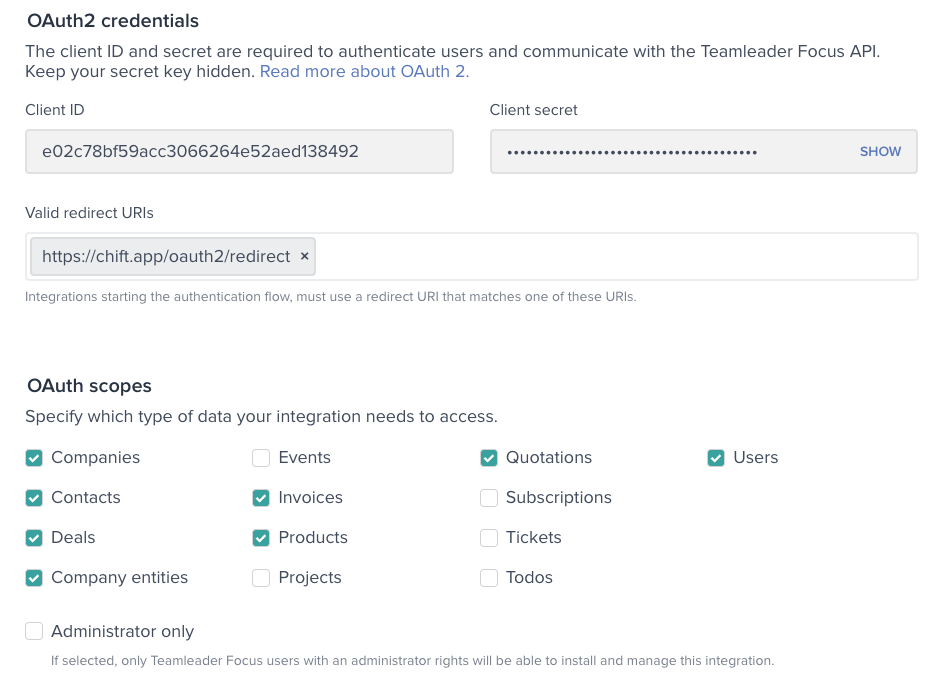
Test Teamleader
To test the software integration, create a free developer account with a sandbox on the Teamleader developer portal.Connect Teamleader
To activate a connection with Teamleader, users will have to go through the following steps.- French article: Help Center - Teamleader FR
- English article: Help Center - Teamleader EN
Limitations & exceptions
- Invoices of type
supplier_refundandsupplier_invoiceare not present. - Contacts of type
supplierare not present and there is no difference betweenprospectandcustomer.