See what this connector supports ↓

Introduction

Moneybird is a Dutch cloud accounting tool for freelancers and small businesses. It covers invoicing, purchase invoices, receipt scanning, quotes and bank reconciliation, feeding everything into financial reports.

Activate Moneybird

Partner keys

You’ll need your own OAuth2 app, registered with Moneybird.
1

Create a Moneybird account

Sign up if you don’t already have one.
2

Register an OAuth2 application

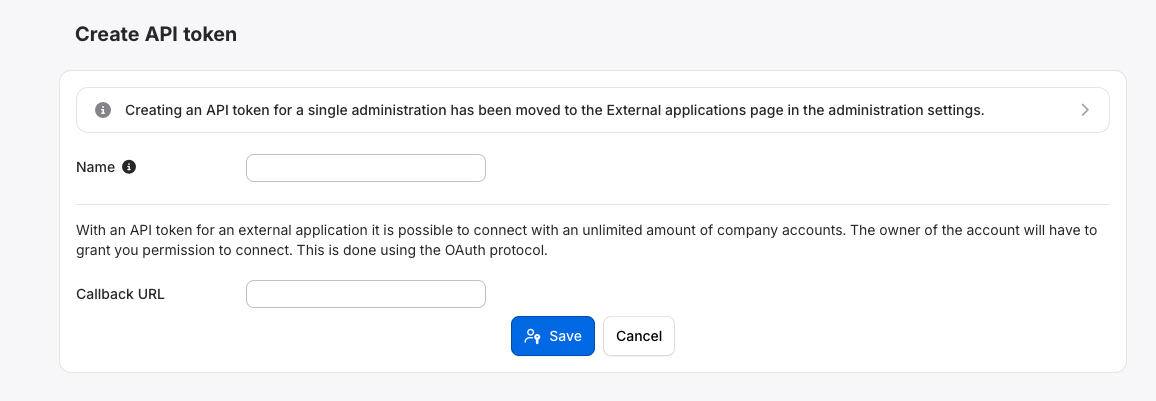
Go to moneybird.com/user/applications/new, enter a name for your app, and set the callback URL to:
Click Save.
Registering an OAuth2 application in Moneybird

Registering an OAuth2 application in Moneybird

No approval from Moneybird is needed. The app is ready to use as soon as you save it. See Moneybird’s developer documentation for the full authentication flow.

Activate Moneybird in your Chift account

In Connectors, enter your client ID and client secret.

Connector settings

The Scopes setting in the Chift Moneybird connector settings, with the required scopes sales_invoices, documents and settings, and the optional bank scope
Scopes sets which scopes Chift requests. They are not set when you create the app in Moneybird:
  • sales_invoices, documents and settings: always requested.
  • bank: optional, requested only when you enable it.
Enable the bank scope if you create bank transactions. Without it, Create bank transactions is refused.

Test Moneybird

Vendor fees

No vendor fees, for you or your end users.

Connect Moneybird

Moneybird setup guide for end users

The full step-by-step, with screenshots.
Before they start, your end users need:
  • the owner role on their Moneybird administration, or the owner’s permission to create integrations (Settings > External & AI integrations)
To connect, they:
  • name the connection (optional)
  • authorize the connection

Rate limits

Moneybird throttles requests per IP address: When the limit is exceeded, Moneybird returns HTTP 429 Too Many Requests. Chift automatically manages these limits to optimize performance and prevent interruptions. However, once the API rate limit is reached, Chift cannot bypass these limitations. Two options require contacting Moneybird support directly:
  • Partners with popular OAuth applications can request a per-administration limit instead of IP-based limits.
  • Accounts that consistently hit the limit can agree volume-based pricing with Moneybird.
See Moneybird’s rate limit documentation.

Limitations & specificities

An invoice number or a reference is required.Only supplier invoices and refunds can be created. Customer invoices and refunds are not supported.
Rules for creating bank transactions:
  • Each external transaction ID is unique, within the request and in the Moneybird administration.
  • Each transaction uses the bank account’s currency.
  • The bank scope is enabled. See Connector settings.
Rules for creating journal entries:
  • They can only be created in the general journal.
  • Client and supplier lines need the force_general_account attribute.
  • Only sales VAT codes can be used.

Coverage

Troubleshooting

Specific errors for Moneybird: