

Overview legend
Overview legend
Introduction
Twinfield is cloud accounting software from Wolters Kluwer, used mainly in the Netherlands and the United Kingdom. It covers bookkeeping, invoicing, VAT and bank reconciliation, for businesses and for accountants working on their behalf.Activate Twinfield
Partner keys
You can use Chift’s app, or register your own with Twinfield.Use Chift's app
Chift creates your dedicated app in your name. Your end users see your company name, not Chift’s, on the OAuth2 consent screen. No Twinfield developer account needed.
Use your own app
Register your own OAuth 2.0 / OpenID Connect client on the Twinfield Developer Portal. Until Twinfield certifies it, an uncertified
ClientId only gets 5% of the standard credit quota. See Rate limits.1
Contact your Chift Customer Success Manager
They create your dedicated Twinfield app and give you its
client_id.2
Complete Twinfield's client details form
Fill in Twinfield’s form with your company information and the 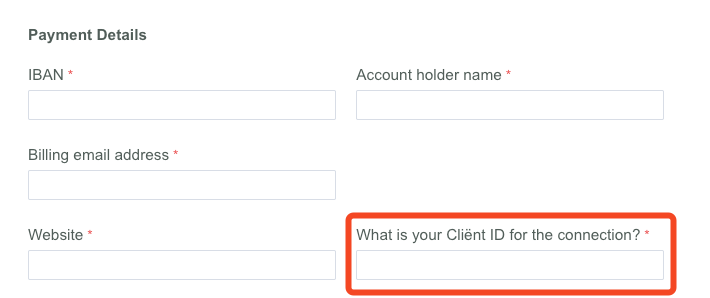
client_id from step 1. The form sets up the €55/month certification subscription. It requires an IBAN and a signature.3
Get your test environment
Once you submit the form, Twinfield provides a test environment and a support portal, included in the certification subscription. Go through Chift for support instead of Twinfield’s portal.
4
Certification
Twinfield certifies your app once it processes your information.
Activate Twinfield in your Chift account
In Connectors, enter your
client_id and client_secret.Connector settings
No connector-specific settings.Test Twinfield
Vendor fees
Software editor (you)
€55/month for Twinfield’s API certification subscription, billed by Wolters Kluwer by direct debit, with a 12-month minimum term.
End user
No fees.
Connect Twinfield
Twinfield setup guide for end users
The full step-by-step, with screenshots.
- a Twinfield user account
- for bank statement integration, a Twinfield role from Level 1 to Level 4
- sign in with their Wolters Kluwer account and a one-time password
- authorize access, keeping every requested permission selected
- select the company to connect
Rate limits
Twinfield applies a credit-based rate limit. Query requests (GET) cost 1 credit, and all other requests cost 3 credits.
Every app Chift creates is a certified integration, with these limits:
When a limit is exceeded, Twinfield returns HTTP
429 Too Many Requests.
Chift automatically manages these limits to optimize performance and prevent interruptions. However, once the API rate limit is reached, Chift cannot bypass these limitations.
See Twinfield’s fair use policy.
Limitations & specificities
Journal entries
Journal entries
Retrieving journal entries requires both a start and end date. The range cannot exceed 3 months.This limit is applied by Chift, not by Twinfield.
Financial entries
Financial entries
An entry posted in a bank or cash journal can only have a number made of digits.Twinfield rejects an entry that would leave a balance sheet account (such as a cash book) with a negative balance.
Bank feed
Bank feed
The external bank statement number can be at most 10 digits.