

Overview Legend 🧭
Overview Legend 🧭
Introduction
NetSuite is the leading integrated cloud business software suite, including business accounting, ERP, CRM and ecommerce software. An AI-powered business management suite, encompassing ERP/Financials, CRM, and ecommerce for more than 41,000 customers.Configure NetSuite
Prerequisites
To activate the connector on your Chift App, you need OAuth credentials (Client ID and Client Secret) that Chift provides to you. → Reach out to your Chift point of contact to request them. Note: Your end users connect their NetSuite account by installing the Chift Integration Bundle (see the Chift Integration Bundle section), so they have no API keys, Client ID, or Secret to obtain on their side.Activation process
Activating NetSuite requires OAuth credentials that Chift provides to you. Reach out to your Chift point of contact to request them, then enter the Client ID and Client Secret at the connector level in your Chift account to activate the connector. OAuth credentials. Chift provides shared OAuth credentials embedded in the Chift Integration Bundle. You enter them once, at the connector level in your Chift account, and they work across all your end users’ NetSuite instances, so there is nothing to configure per instance or per client. Your end users never handle these credentials: to connect, they install the bundle, authorize, and provide only their NetSuite Account ID. Using your own credentials. If you’d rather use your own OAuth credentials (e.g. under your own brand), Chift can create a dedicated bundle for you; you then enter your own Client ID / Secret at the connector level. Contact your Chift point of contact to set this up.Set up
A few NetSuite behaviours are controlled by connector-level preconfigure fields in your Chift account (Connectors → NetSuite → Preconfigure fields). A value set here applies to all your NetSuite connections and is hidden from your end users — configure them once, based on the capabilities you need. Each field defaults to inactive.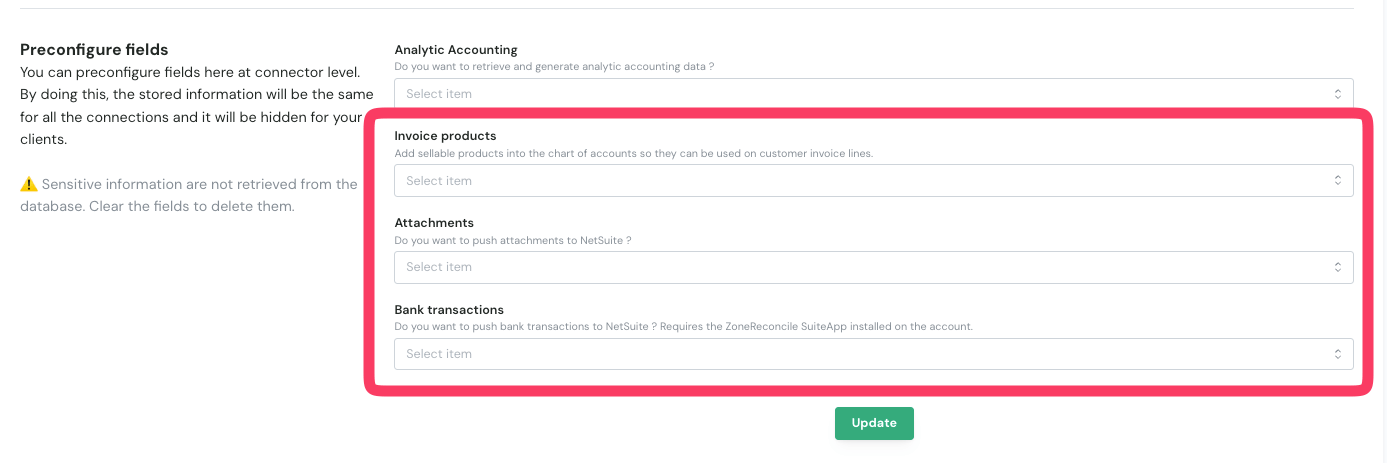
Leave a capability inactive if you don’t use it. Enabling Attachments or Bank transactions makes Chift check, at connection time, that the required bundle RESTlet / ZoneReconcile SuiteApp is installed — so only enable them once those prerequisites are in place.
Test NetSuite
A sandbox environment is available from NetSuite, but only for customers with an active NetSuite subscription. It is typically priced at ~10–20% of the annual subscription cost. In practice, the recommended approach is to partner with beta clients or partners who already have NetSuite access and can provide a test environment for integration testing.Connect NetSuite
Your end users connect their NetSuite account by installing the Chift Integration Bundle in NetSuite, assigning the bundled role, and authorizing in Chift. For the detailed step-by-step guide, check out the documentation: See the following paragraph about the Chift Integration Bundle that end users install.Chift Integration Bundle
Chift connects to NetSuite through a SuiteBundle that your end users install in their NetSuite account in one click. The bundle delivers everything the connector needs — no file uploads, no manual script configuration, and no copying of a Client ID or Secret. It does not modify the native behavior of NetSuite; it packages the objects Chift needs to read and write data.What the bundle delivers
- A RESTlet script and deployment — powers attachments and bank transactions, which NetSuite’s native REST API cannot handle.
- Two ready-to-assign custom roles —
Chift Integration(full read + write) andChift Integration (Read Only)(read-only). See the Roles & permissions section below. - The OAuth 2.0 integration record — installs already enabled, with Chift’s OAuth app embedded. Your end users never see or enter a Client ID or Secret.
- A
Chift AttachmentsFile Cabinet folder — the default target for stored attachments (overridable in Chift’s post-connection settings).
End-user onboarding
Installing and connecting the bundle is a four-step process for the NetSuite administrator: enable SuiteCloud features → install the bundle → assign a role to the connecting user → authorize in Chift (only the NetSuite account ID is required). The full step-by-step guide lives in the Help Center article.The connection runs with the role the end user authorizes with. End users can connect with one of the bundled roles or their own scoped role — see the Roles & permissions section below. After assigning or changing a role, the end user must log out and back in for it to appear at the consent screen.
Compatibility & requirements
- Attachments and all standard accounting endpoints work over the single OAuth 2.0 token — there is no separate token-based-authentication step.
- Bank transactions require the third-party ZoneReconcile (Zone & Co) SuiteApp to be installed (see Limitations).
- OneWorld (multi-subsidiary) accounts: the role ships with Subsidiary Restrictions set to All so the connector can see every subsidiary. Restricting it to User Subsidiary (or disabling Include Sub-Subsidiaries) hides child subsidiaries from Chift.
- Custom segments used as analytic dimensions: enable the SuiteCloud Custom Segments feature and grant the matching permission on the role, otherwise analytic dimensions silently return empty.
Roles & permissions
The connection runs with whatever role the end user authorizes with, so that role determines how much access Chift has. NetSuite enforces the access itself — the bundle’s RESTlet accepts any role — so end users can pick the option that fits their security requirements:Chift Integration(read + write) — the bundled role for full read/write access. Use it when Chift needs to create data (invoices, journal entries, bank transactions, attachments, …).Chift Integration (Read Only)— the bundled role for read-only access. Use it when Chift only reads data.- Your own role — end users can connect with an existing or custom NetSuite role scoped to their needs, granting only the permissions the Chift features they use actually require. A per-feature endpoint→permission mapping table will document exactly what to enable (coming soon).
Limitations
POST invoices/payments (Create an invoice payment): Payment method must be linked to a ledger account
A payment method must be linked to a ledger account in NetSuite to be used in an invoice payment. This configuration is done at the payment method level in NetSuite — you will have to make sure each payment method you intend to use for invoice payments has a ledger account assigned. An error will be thrown if this is not the case.
Bank transactions require the ZoneReconcile SuiteApp
Bank-statement and transaction records are not part of the Chift bundle — they are owned by the third-party ZoneReconcile (Zone & Co) reconciliation SuiteApp. Creating bank transactions therefore requires ZoneReconcile to be installed on the NetSuite account, with theChift Integration role granted Full access to its bank record types (customrecord_bank_statement, customrecord_ba_transactions) and Lists → Perform Search. Attachments and all standard accounting endpoints do not depend on this.