

Overview legend
Overview legend
Introduction
Xero is a cloud accounting platform for small and medium-sized businesses. It is used for bookkeeping, bank reconciliation and reporting.Activate Xero
Partner keys
You’ll need your own OAuth2 app, registered with Xero. You need a Xero account and the pricing plan that matches the data you plan to access. New apps start on the free Starter tier, capped at 5 connected organizations. Add a payment method to move to Core, which allows up to 50. Certification is only required from the Plus tier, for more than 50 connections.1
Create a Xero account
If you don’t have one yet, start a free trial.
2
Create the app
Sign in to the Xero Developer Portal and create a new app:
- App name: a name your users will recognize during the OAuth flow
- Integration type: Web app
- Company or application URL: your company’s website, starting with
https:// - Redirect URI:
3
Get the credentials
In My Apps, open your app. Reveal the Client ID, then click Generate secret to create the Client Secret. Copy both and store them securely.
Certification and connection limits
Certification and connection limits
Starter tier. Every new app starts on the free Starter tier:
- at most 5 connected organizations
- 1,000 calls per day per organization
- 60 calls per minute
- Xero recommends applying once you have onboarded at least 10 beta customers.
- Xero reviews the app: error handling, secure data management, and the onboarding flow (Sign In with Xero).
- A Xero App Store listing needs Plus or above:
- optional on Plus and Advanced
- required on Enterprise
- not available on Starter and Core
Activate Xero in your Chift account
In Connectors, enter your Xero Client ID and Client Secret.
Special certification for financial services
If your app falls into one of these categories, the standard certification does not apply: you operate under a specific financial services contract with Xero, not the standard developer terms.
- Bank feeds: pushing transaction data into Xero automatically. Xero’s Bank Feeds API is closed: it is only open to financial services partners, and Xero must certify the integration before customers can use it.
- Lending & credit: reading Xero data to assess creditworthiness or to offer business loans.
- Expense management: dedicated flows for corporate cards and employee reimbursements.
- Payment services: moving funds between bank accounts and Xero.
Connector settings
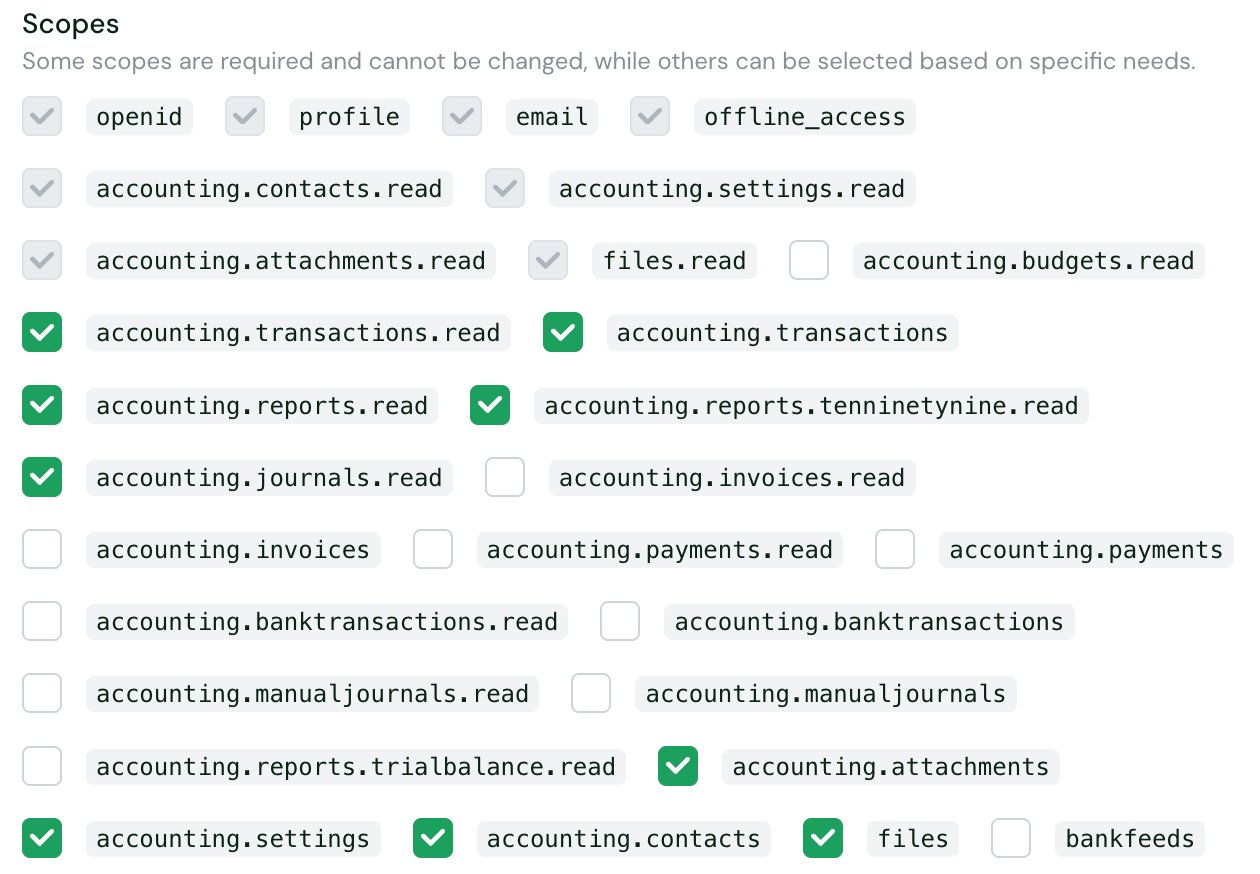
openid, profile, email, offline_access, accounting.contacts.read, accounting.settings.read, accounting.attachments.read and files.read.
Some scopes are deprecated and cannot be requested by apps created on or after March 2, 2026: doing so returns an invalid scope error. Apps created before that date can use them until September 2027. See Xero’s organization scopes.
The accounting.reports.read scope is replaced by granular report scopes. Of these, Chift only offers accounting.reports.trialbalance.read.
All scopes
All scopes
Test Xero
About the demo company:
- It resets automatically 28 days after creation, and you then need to reconnect your app.
- You cannot invite other users to it.
Vendor fees
Software editor (you)
From free to €845 per month (excl. tax), billed on the number of connected companies and the data downloaded each month. See the tiers below.
End user
No fees. Xero bills the API tiers to the software editor, not to the end user.
Prices exclude tax. Beyond the quota, each additional GB costs €1.45.
The premium APIs are the Journals API
GET /Journals, the Xero Practice Manager API and bulk connections. They need:
- the Advanced tier or above
- a security assessment, initial and yearly
- a use-case validation by Xero
Connect Xero
Xero setup guide for end users
The full step-by-step, with screenshots.
- an active Xero subscription for the organization
- a Xero user with the Standard, Adviser or Administrator role and the Connected Apps permission
- while your app is not certified: an organization can connect at most 5 uncertified apps
- for cashbook and ledger (partner edition) organizations: a member of the practice staff to authorize the connection, since managed client and cashbook client roles cannot
- sign in to Xero and authorize your app
- choose the organizations they want to connect
- pick the organization to use in the Tenant ID list shown after authorization. This step disappears when the connector option Let the user specify the folder? is turned off
Rate limits
Xero applies fixed quotas per tenant. A tenant is an organization, account or practice.
Windows are fixed and reset at different times for each tenant.
When a limit is exceeded, Xero returns HTTP
429 Too Many Requests, with an X-Rate-Limit-Problem header naming the limit reached. For the minute and daily limits, it also sends Retry-After, in seconds.
Chift then returns ERROR_RATE_LIMIT (HTTP 429), with a message saying which limit was hit and when requests will be accepted again.
Chift does not retry a request that hit the per-minute or daily limit. Wait for the time given in the error before sending it again.
Certified apps on Plus and above get Rapid Sync: the standard limits are lifted for the first 30 minutes of a new connection.
See Xero’s rate limit documentation.
Limitations & specificities
Contacts (clients & suppliers)
Contacts (clients & suppliers)
GET suppliers only returns contacts that Xero flags as suppliers, meaning contacts with at least one bill. A new supplier contact without a bill does not appear. GET clients returns every contact, suppliers included.Why: in Xero, every customer and supplier is a contact. Xero infers the supplier role from activity; it is not stored as a separate record.Journal entries
Journal entries
Journals and manual journals are two unrelated objects; manual journals are not a subset of journals:
- Journal (
GET /Journals) maps toGET Journal Entriesin Chift. It is read-only and returns every general-ledger entry, including those generated from invoices and payments. It is a premium API: it needs the Advanced tier and a security assessment. - Manual journal (
/ManualJournals) maps toPOST Journal Entryand toGET Journal Entrieson the manual journal in Chift. It covers manual journals only, on every tier.
force_general_account with the general ledger account to book it on.Chart of accounts & VAT
Chart of accounts & VAT
Xero returns account balances year to date only, from the start of the current fiscal year: a custom start date is not supported.On journal entries, the tax amount must match the tax code: a 0% tax code needs a tax amount of 0, and a tax code with a positive rate needs a non-zero tax amount.